
How to migrate mobile user numbers to Genesys Cloud / Mobile Office and give everyone a personal number
Giving your mobile workforce personal numbers in Genesys Cloud#
When you bring your mobile workforce into Genesys Cloud with Mobile Office, you might want agents to have their own personal number. Where do those numbers come from, and what happens to the numbers your people already use? Below are the three options we see most with our customers. Whichever route you take, discuss it with your Genesys Cloud solutions architect or partner first: number availability, porting rules, and caller ID regulations differ per country.
This article assumes you use Genesys Cloud Voice. With BYOC, the same options apply, but you arrange numbers and porting through your own carrier.
Option 1: Buy new numbers#
The easiest solution: purchase DID numbers directly in Genesys Cloud and assign them to users. We see this a lot because it is technically very simple: no dependency on your old carrier, no paperwork, no cutover moment. Business-wise it is not always the best fit, though. Customers do not recognize the new numbers, and calls to the old ones go unanswered unless you add forwarding, which effectively turns this into option 3.
Option 2: Port your existing numbers#
Porting moves your existing numbers into Genesys Cloud Voice, so everyone keeps the number they already know. This creates the least friction, but feasibility depends on your country, as porting is regulated locally. For the US and Canada, see the porting overview and Port DID numbers. For Europe and Latin America, porting runs through a form-based process with the Genesys porting team, described in Port numbers in EMEA and LATAM.
Plan ahead: submit your port request two to three weeks in advance, and do not disconnect anything at your current carrier before the port completes. Note that SMS does not move automatically with the voice port, and expect a short cutover window on the activation date.
Option 3: Buy new numbers and forward the old ones#
This is the option we see the most in practice: buy new numbers in Genesys Cloud and keep your existing numbers at your original carrier. Inbound, the customer dials the number they have always used, the original carrier forwards the call to the new Genesys Cloud number, and Mobile Office rings. Outbound, you configure Genesys Cloud to spoof the old number as caller ID, using the Prioritized Caller Selection feature on the external trunk. Customers see the familiar number and can simply call it back. The diagram below shows both directions.
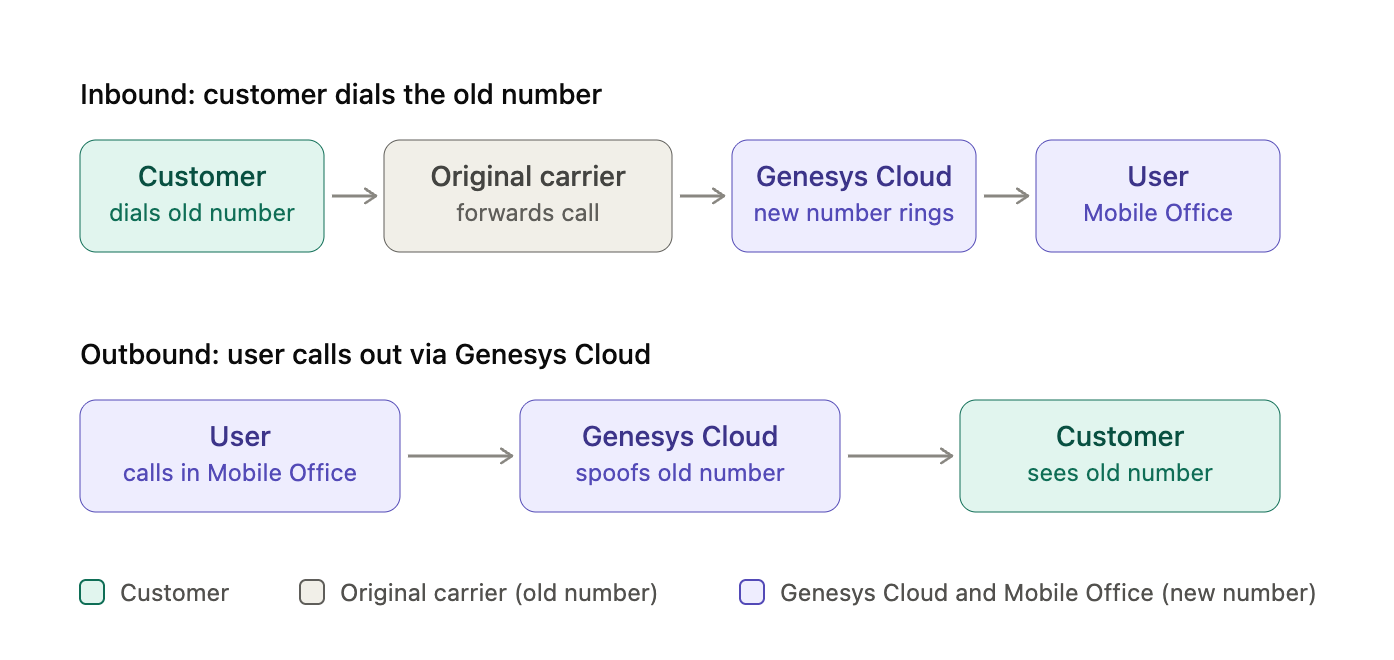
A few things to watch out for. Forwarded calls generate two billed legs: one at your original carrier and one in Genesys Cloud. Ask your original carrier to pass the original caller's number through on forwarded calls, so users and routing still see who is calling. Spoofing a number held at another carrier is subject to local regulation (in the US it can affect your STIR/SHAKEN attestation), so verify this with Genesys or your partner. And SMS to the old numbers stays at the original carrier.
Option 3 also works well as a stepping stone: go live quickly with forwarding in place, and port the old numbers (option 2) once the migration has proven itself.
Which option should you pick?#
If speed matters most, buy new numbers. If continuity matters most and porting is well supported in your country, port. If you want continuity now without the porting project, forward the old numbers and decide about porting later. Still unsure? Talk to your Genesys Cloud solutions architect or partner, or reach out to our team. We have guided customers through all three routes.