
Alternative for bad internet connection: understanding PSTN Calling
Mobile Office for Genesys offers two primary ways to handle voice calls: WebRTC (internet calling) and PSTN (regular telephony network calling). These options allow flexibility depending on your network quality and work environment.
What is WebRTC and how does it work?#
WebRTC (Web Real-Time Communication) is a modern, open-source framework for real-time communication over the internet. It offers a low-latency and high-quality voice connection, and is the preferred way to use Mobile Office. However, this requires a stable WiFI or 4G/5G connection.
What is PSTN and how does it work?#
PSTN (Public Switched Telephone Network) is the traditional telephone network — it uses your mobile phone’s SIM card and regular phone network to make voice calls.
Using PSTN with Mobile Office#
In Mobile Office, PSTN can be used as an alternative phone method to WebRTC when you experience internet or connection difficulties. You will see some differences in how the app behaves for inbound and outbound calls:
Different for inbound calls with PSTN:
- The call will not come in as a Mobile Office call but as a regular phone call
- If you have internet connection, you can still navigate to the call in Mobile Office to see the call details.
Different for outbound calls with PSTN:
- You initiate the call from the Mobile Office app.
- Genesys Cloud first calls you to your mobile phone via PSTN. Regardless of who you're calling, you'll always see the same number calling you.
- Once you answer the incoming call, it connects the call to the customer or recipient using the queue number from Genesys.
How to switch?#
-
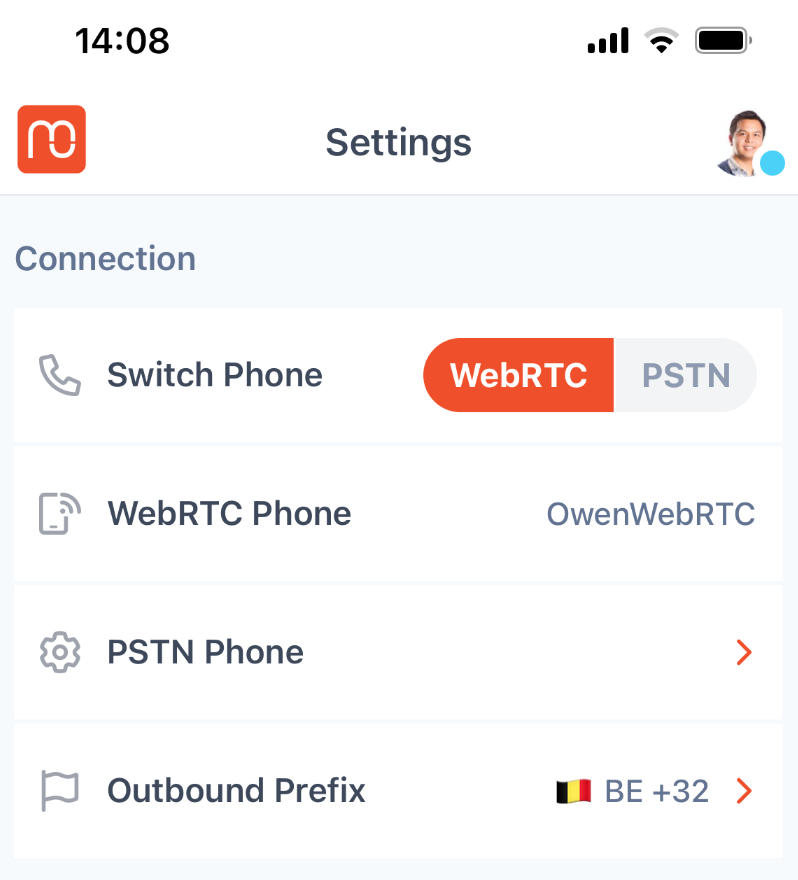
Navigate to settings
-
Make sure a PSTN phone is selected in "PSTN phone". If not, click on "PSTN phone", search for your phone and select it.
Note: Your PSTN phone needs to be setup by a Genesys Admin first. If you are unsure if this is the case or don't know what your PSTN phone is called, contact them.
-
Toggle the setting in "Switch Phone" to switch from WebRTC to PSTN.
Note: Even though you're talking over the cellular network, Genesys still controls routing, recordings (if configured), and call logging.